Reading Sector Deltas to Find the Fastest Line
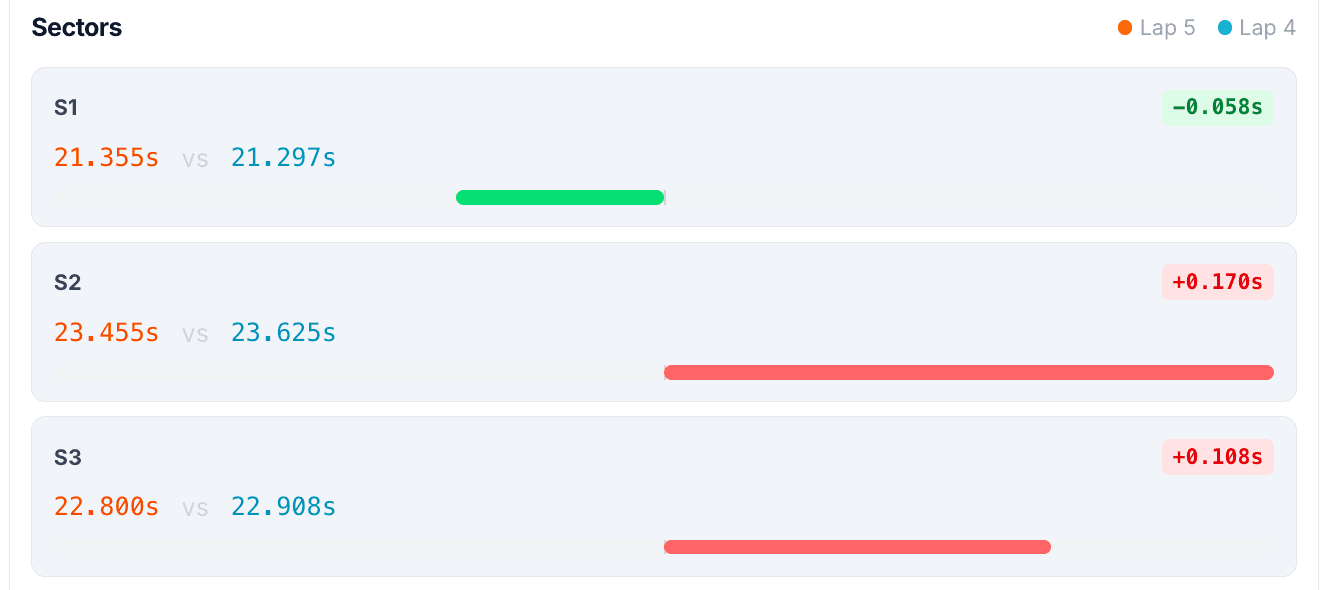
A sector delta is the time difference between two laps over a section of track. A positive delta means you lost time there, a negative delta means you gained. Read the deltas to find the sectors where you are slow, then stitch your fastest sectors from different laps into a single theoretical best lap and go drive it.
Sector deltas are how you stop guessing about where the lap time went. Instead of comparing two total lap times and shrugging, you compare the lap in pieces and see exactly which pieces cost you. Done well, this is one of the fastest ways to improve.
What is a sector delta?
The lap is split into sectors, either the timing sectors from the track or finer splits you define. For each sector, the software compares your time against a reference lap, usually your own best, and reports the difference. A delta of +0.150 in sector 2 means you were 0.150s slower than your reference through that sector. Add the sector deltas up and you get the total lap-time difference.
What is the difference between sector deltas and a time delta trace?
Sectors are chunks. The rolling time delta is continuous. The time-delta trace shows the gap between two laps at every point on track, so you can watch it climb through the exact corner where you lost time and fall back where you gained. Sectors tell you which neighborhood to look in; the rolling delta points at the specific corner. Use them together.
How do I read them to find the fastest line?
Start with the sector that shows the biggest loss, then drop into the rolling delta and the speed trace for that sector to see why. A few common readings:
- The delta climbs steeply through one corner: you lost it there, usually a low minimum speed or a late exit.
- The delta climbs gently across a whole sector: a line or rhythm issue, not one single corner.
- The delta jumps right after a corner exit: a slow exit that cost you down the following straight.
- The delta is flat then drops: you gained in that stretch, worth noting what you did differently.
How do I build a theoretical best lap?
This is the payoff. Your best total lap is rarely your best in every sector. Take your fastest time in each sector, even if they came from different laps, and add them up. That sum is your theoretical best lap, the time you have already proven you can do in pieces.
| Sector | Best lap | Other lap | Best ever |
|---|---|---|---|
| S1 | 15.420 | 15.310 | 15.310 |
| S2 | 18.640 | 18.710 | 18.640 |
| S3 | 17.180 | 17.090 | 17.090 |
| Lap | 51.240 | 51.110 | 51.040 |
In this example your best actual lap is 51.110, but your best sectors add up to 51.040. That 0.070 is time you have already driven, just not all on the same lap. Chasing your theoretical best is often more productive than chasing an abstract target, because you know it is real.
Where do I see this?
Race Studio can show sector splits, and a karting tool makes the theoretical best and the time-delta map immediate. Speed Lab draws the rolling time delta on the track map, so you can see the gap open and close around the lap, and it surfaces your best sectors automatically. See it on a real session in the live demo. To connect this with the rest of the method, read finding lap time with data and how to compare two kart sessions.
See it on a real session
The quickest way to make this click is to look at real data. The live demo walks through a full kart session, speed traces, track map, sector deltas, and an AI coaching report, with no account needed.
Kart Track Team
Telemetry analysts at Kart Track
The Kart Track team builds Speed Lab, the telemetry analysis engine behind karttrackapp.com. We spend our days parsing MyChron and Alfano data and building the speed traces, track maps, and AI coaching reports that turn raw laps into specific, corner-by-corner feedback for kart racers.