How to Read MyChron Telemetry Data (A Kart Racer’s Guide)
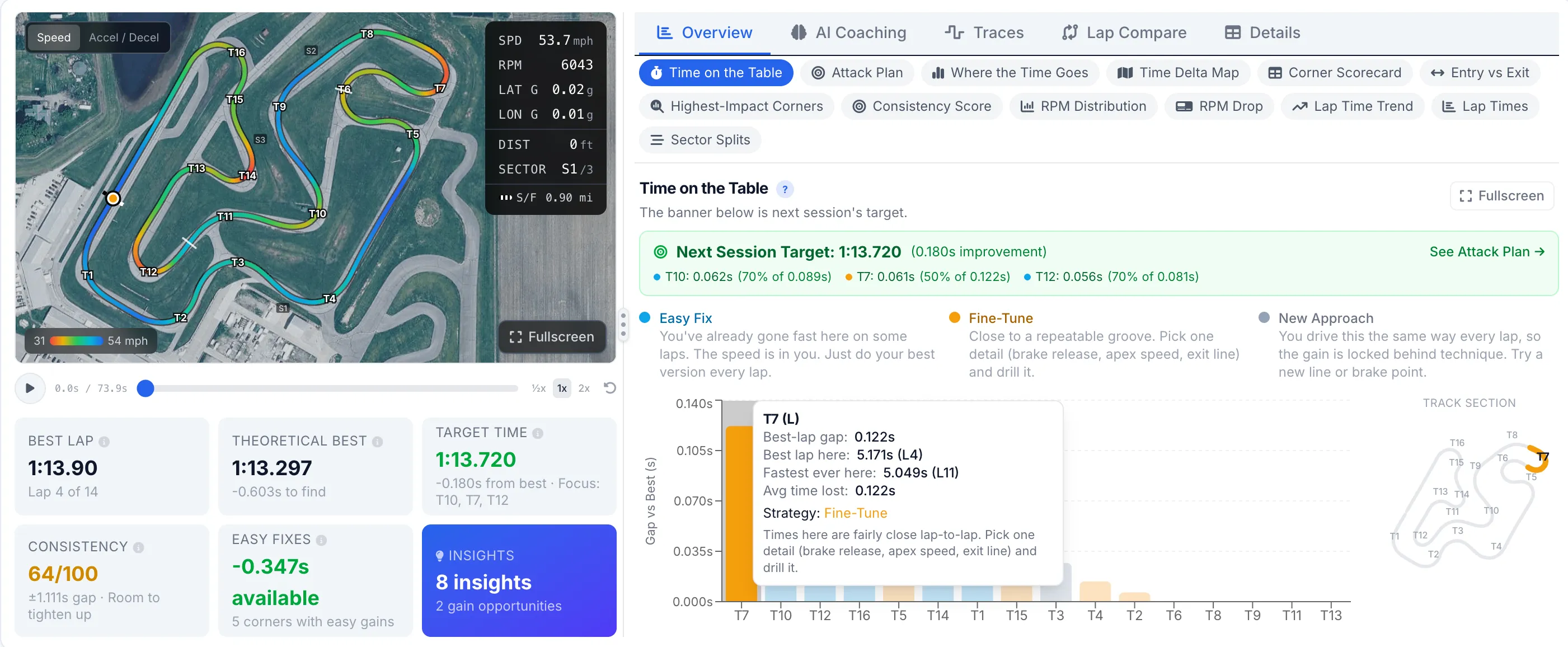
Reading MyChron telemetry means turning a handful of channels into a story about where your kart slows down, turns, and speeds back up. The four channels that matter most are GPS speed, RPM, lateral G, and longitudinal G. Read them lap over lap and the corners costing you time show up clearly: lower minimum speeds, later acceleration, and untidy G traces.
A MyChron 5 or 6 records far more than most drivers ever look at. The good news is you do not need all of it. This guide is the overview. It covers what the logger captures, the channels worth your attention first, and how to read driver inputs on a kart that has no throttle or brake sensor. Each section links to a deeper post in this series.
What does a MyChron actually record?
Every MyChron logs a core set of channels by default. With the right sensors fitted, it adds a few more. Here is the practical breakdown.
| Channel | What it tells you |
|---|---|
| GPS Speed | Your speed at every point on track. The single most useful channel. |
| RPM | Engine speed. Confirms gearing, shift points, and whether the engine is pulling. |
| Lateral G | Cornering load. How hard the kart is turning at any moment. |
| Longitudinal G | Braking and acceleration, read from deceleration and acceleration. |
| GPS position | Builds the track map and lets the software split the lap by distance. |
| Water temp | Engine temperature. A health and consistency check, not a lap-time tool. |
| EGT (if fitted) | Exhaust gas temperature on a two-stroke. Used for jetting, not driving. |
For finding lap time, the first four are where you live. Water temp and EGT matter for engine health and setup, but they will not tell you where you are slow.
Which channels should I start with?
Start with GPS speed. Overlay two laps and the speed trace shows where one lap carried more speed and where it bled off. Add lateral G to see how hard you are loading the kart through each corner, and longitudinal G to see where you slow down and how hard. RPM sits underneath all of it as a sanity check on gearing and shift points. If you want the full channel rundown, read what MyChron channels actually matter.
How do I read driver inputs without a throttle or brake sensor?
Here is the part that trips up drivers coming from car data. Most karts have no brake or throttle position sensor. The pedals connect by direct linkage, so there is nothing to log. You read your inputs indirectly, from the accelerometer and from speed.
- Braking shows up as longitudinal deceleration, a downward spike in the longitudinal G trace. The deeper and later it starts, the later you braked.
- Acceleration shows up as positive longitudinal G coming off the corner, paired with rising GPS speed and RPM.
- Cornering shows up as lateral G. A well-driven kart will often hold 1.5 to 2.0 G of lateral load through a quick corner.
This is why we never talk about a throttle trace on a kart. Everything is derived from G-force and speed. Our deeper post on finding your braking points from telemetry walks through exactly how to read the longitudinal trace.
What does a fast lap look like in the data?
Compare your best lap to a slower one and a fast lap almost always shows the same signatures: a higher minimum speed in the corner, a shorter time spent slowing down, and acceleration that starts earlier and builds cleanly. Slow laps show the opposite: the speed trace dips lower, sits at the bottom longer, and climbs late. A tenth here is rarely one big mistake. It is usually two or three corners each giving up a few hundredths.
How do I get the data off the logger?
You download the session from the MyChron and export it from AiM Race Studio 3, the free official software, as a CSV. Then you can analyze it. The full walkthrough is in how to export MyChron data from Race Studio, and the quick version lives on our export guide.
Reading it lap over lap
The real work is comparison. One lap on its own tells you a time. Two laps overlaid tell you where the time went. Line up your fastest lap against a slower one, watch the speed traces diverge, and a rolling time delta will show you the exact stretch of track where the gap opened up. That is the heart of finding lap time with data and of reading your speed trace.
Race Studio will show you all of this if you are willing to learn it. If you would rather upload the same CSV and get a karting-specific dashboard with the corners already flagged, that is what Speed Lab does. See the Kart Track vs Race Studio comparison for how the two differ.
See it on a real session
The quickest way to make this click is to look at real data. The live demo walks through a full kart session, speed traces, track map, sector deltas, and an AI coaching report, with no account needed.
Kart Track Team
Telemetry analysts at Kart Track
The Kart Track team builds Speed Lab, the telemetry analysis engine behind karttrackapp.com. We spend our days parsing MyChron and Alfano data and building the speed traces, track maps, and AI coaching reports that turn raw laps into specific, corner-by-corner feedback for kart racers.