Alfano 6 Data Analysis: Getting More From Your Logger
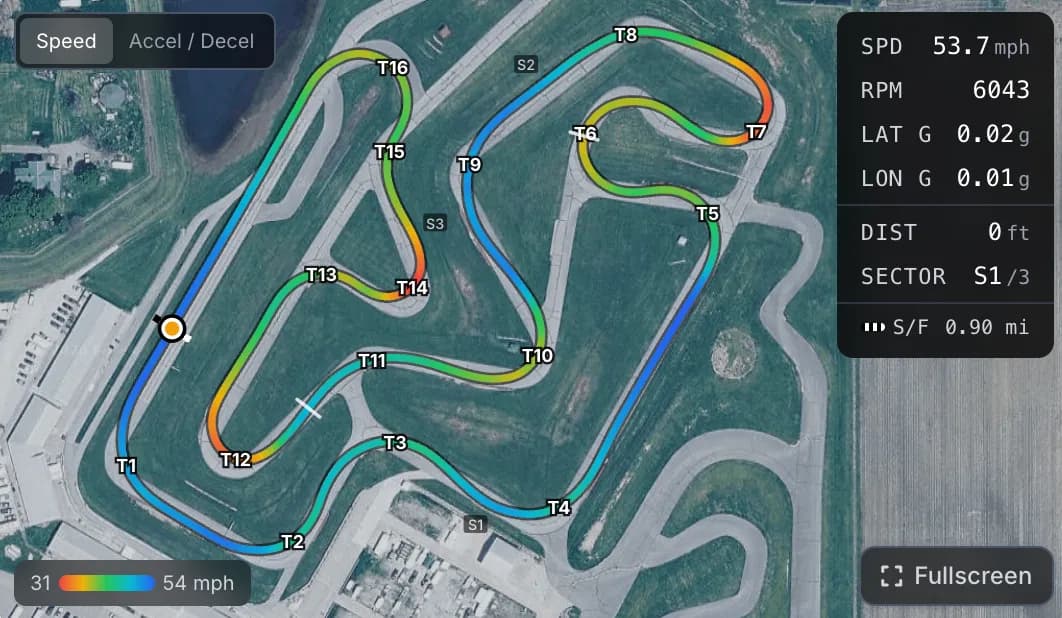
Getting more from an Alfano 6 comes down to recording the right channels, GPS speed, RPM, and the lateral and longitudinal G, then exporting your sessions and actually comparing laps. The Alfano captures strong data. The lap time is found in how you read it, not in the logger itself.
The Alfano 6 is a capable logger with a loyal following, and a lot of drivers use maybe a quarter of what it can do. This post is about closing that gap: which channels to record, how to get your data out, and how to turn it into corner-by-corner analysis.
What channels should I record on an Alfano 6?
The same priorities apply to an Alfano as to any kart logger. GPS speed and GPS position are essential, because they drive your speed trace, track map, and lap timing. RPM confirms gearing and shift points. The lateral and longitudinal accelerometers are how you read cornering and braking, since a kart has no brake or throttle sensor. Add engine temperature for health, and exhaust gas temperature if you run a two-stroke and want it for jetting. Record everything available and focus your attention on speed and the G channels.
How do I export Alfano data?
Connect the Alfano to the Alfano app, download the session you want, then share or export it. The simplest path is to use the share option to send the session to yourself, which produces a ZIP archive you can open on a computer. Keep it as a ZIP. From there you can analyze it. The step-by-step, including the share button location, is on our export guide.
How do I analyze the session?
The method is logger-agnostic. Overlay your fastest lap on a slower one and read the speed trace for low minimum speeds, flat-bottomed corners, and late acceleration. Use the track map to see your racing line and where on track the speed is bleeding away. Use sector splits and the time delta to find which corners cost the most. Then change one thing and measure again. The full walkthrough is in reading your speed trace and reading sector deltas, which apply directly to Alfano data.
What can I do that the native software cannot?
The Alfano software reads Alfano data well, but like every manufacturer tool it only reads its own brand. The two things drivers most often want beyond it are cross-logger comparison and a guided read of the data:
- Compare against a MyChron. If a teammate or competitor runs a MyChron, you cannot line your laps up in the Alfano software. Speed Lab parses both into the same model and overlays an Alfano lap on a MyChron lap.
- Get the corners flagged for you. A karting-specific dashboard and an AI coaching report point straight at where you are losing time, instead of leaving you to find it by eye.
Getting more from it, in practice
Pick one session this week and actually study it. Find your two slowest corners relative to your best lap, work out whether it is entry or exit, and try one change next time out. That habit, more than any logger feature, is what turns data into lap time. Read corner entry vs exit next, and see Alfano data in a karting dashboard in the live demo. For where this sits against the manufacturer tools, see Race Studio and Alfano software alternatives.
See it on a real session
The quickest way to make this click is to look at real data. The live demo walks through a full kart session, speed traces, track map, sector deltas, and an AI coaching report, with no account needed.
Kart Track Team
Telemetry analysts at Kart Track
The Kart Track team builds Speed Lab, the telemetry analysis engine behind karttrackapp.com. We spend our days parsing MyChron and Alfano data and building the speed traces, track maps, and AI coaching reports that turn raw laps into specific, corner-by-corner feedback for kart racers.
Related in this series
- Kart Data Logger Guide: MyChron, Alfano, and What to Track
- MyChron vs Alfano (2026): Which Kart Data Logger Should You Buy?
- MyChron 6 vs Alfano 7: Which New Kart Data Logger Should You Buy?
- MyChron 5 vs MyChron 6: Should You Upgrade?
- Alfano ADA Guide: Getting Data Off Your Alfano 6 or 7
- How to Compare Two Kart Sessions (and What to Look For)